A Chrome browser extension is a small software program that adds new features to the Chrome web browser. When you install an extension, it typically adds a new button or icon to the Chrome toolbar or menu. Clicking on that button will activate the extension and allow it to perform the task it intends to do.
Directo is a free Chrome extension that helps travelers see hotel prices from direct booking sites and other sources in one place. It compares available prices, highlights lower or negotiated rates when available, and lets travelers choose where to book without being directed to a single platform.
1. Visit the Chrome Store from your computer.
2. Click “Add the extension.”
3. Install it in your browser.
4. Pin the extension to your browser toolbar so it’s always visible.
You can download the Directo Chrome extension in the Google Chrome Store.
If you have Iphone and you can test our Beta version, you can try it on Safari here
Directo is 100% free for travelers. All features of the Directo Chrome extension are entirely free. You can download on Google Chrome Store.
If you manage a hotel or vacation property and want to be featured in Directo, you can sign up here
Directo works on all Chromium-based browsers that support Chrome extensions. This includes browsers such as: Google Chrome, Microsoft Edge, Brave, Opera.
We always recommend using Directo on Desktop for the full experience.
Directo does not currently work as a full mobile app, although we have a beta version for Safari mobile, for Iphone.
No.
You can use Directo without creating an account or signing up.
Directo runs in your browser and looks for the best hotel prices while you browse. It shows direct prices and other booking options so you can easily see which deal works best for you.
The yellow “D” appears when the same hotel is available on other websites. Click it to compare prices and find the hotel’s direct booking site.
Yes, Directo works globally and can be used to search for accommodations in any country or city 🌍.
Yes, Directo extension is safe to use! The extension only works on travel sites.
This can happen if:
- The extension is not enabled or pinned in your browser. Check this
- The property doesn’t have an official website or we haven’t found an alternative deal.
- There are no better conditions available for this property.
Check these steps to ensure that Directo is installed correctly.
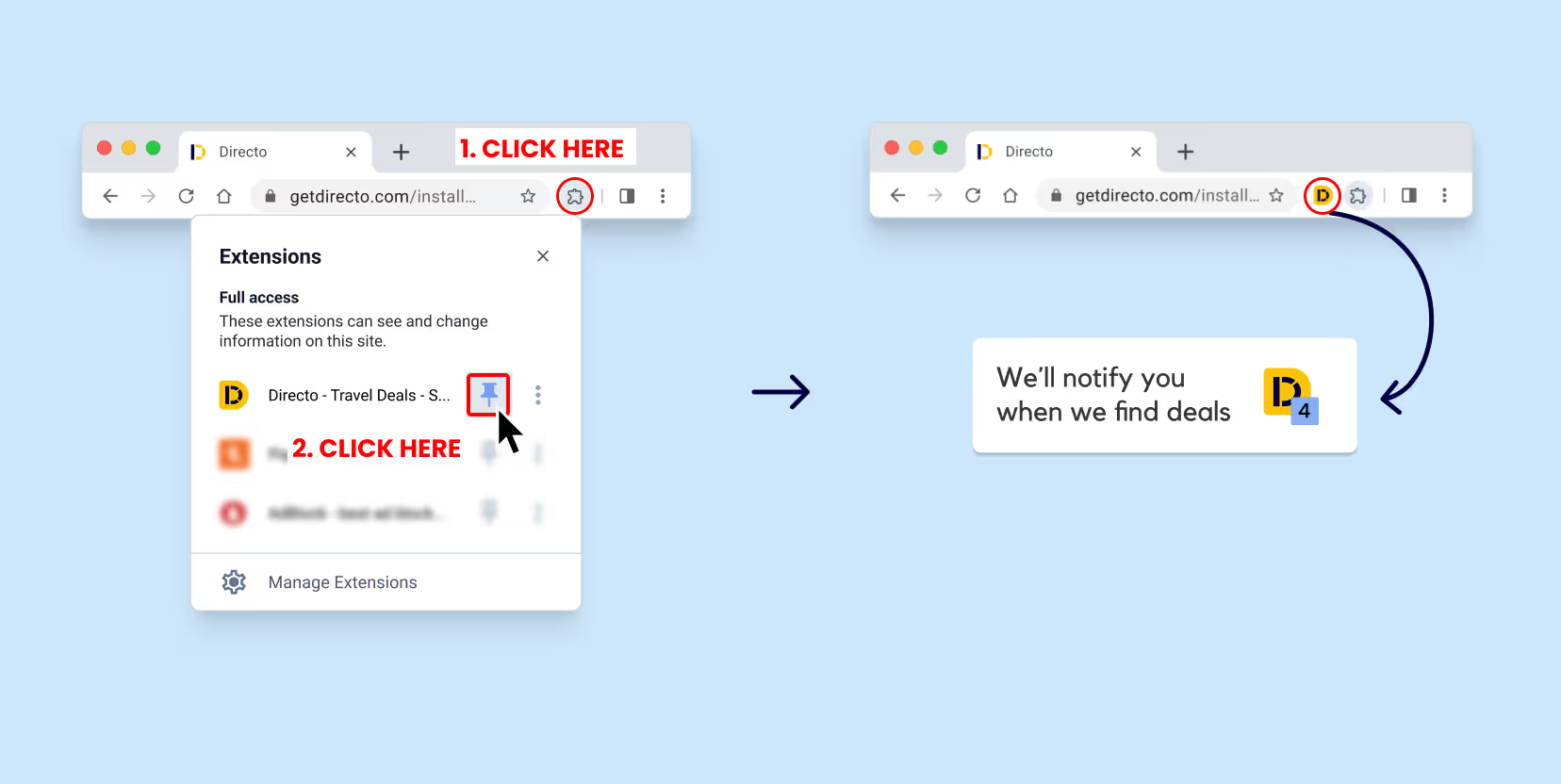
Pinning Directo lets you instantly know when direct hotel deals are available while you browse.
Steps to pin the extension:
1. Click the Extensions icon 🧩 in your browser.
2. Click the pin icon 📌 next to Directo.
3. You’ll see the Directo “D” icon fixed in your browser toolbar.
Directo Deals are special hotel prices negotiated by Directo with trusted partners.
They allow you to book the same hotel, for the same dates, often at a lower price or with better conditions.
When a Directo Deal is available, you’ll see it directly while browsing and can choose it as one of your booking options.
When you select a Directo Deal, you’ll be taken to secure.getdirecto.com, Directo’s official booking interface powered by trusted partners.
This is where the negotiated price is available and where you can complete your booking securely
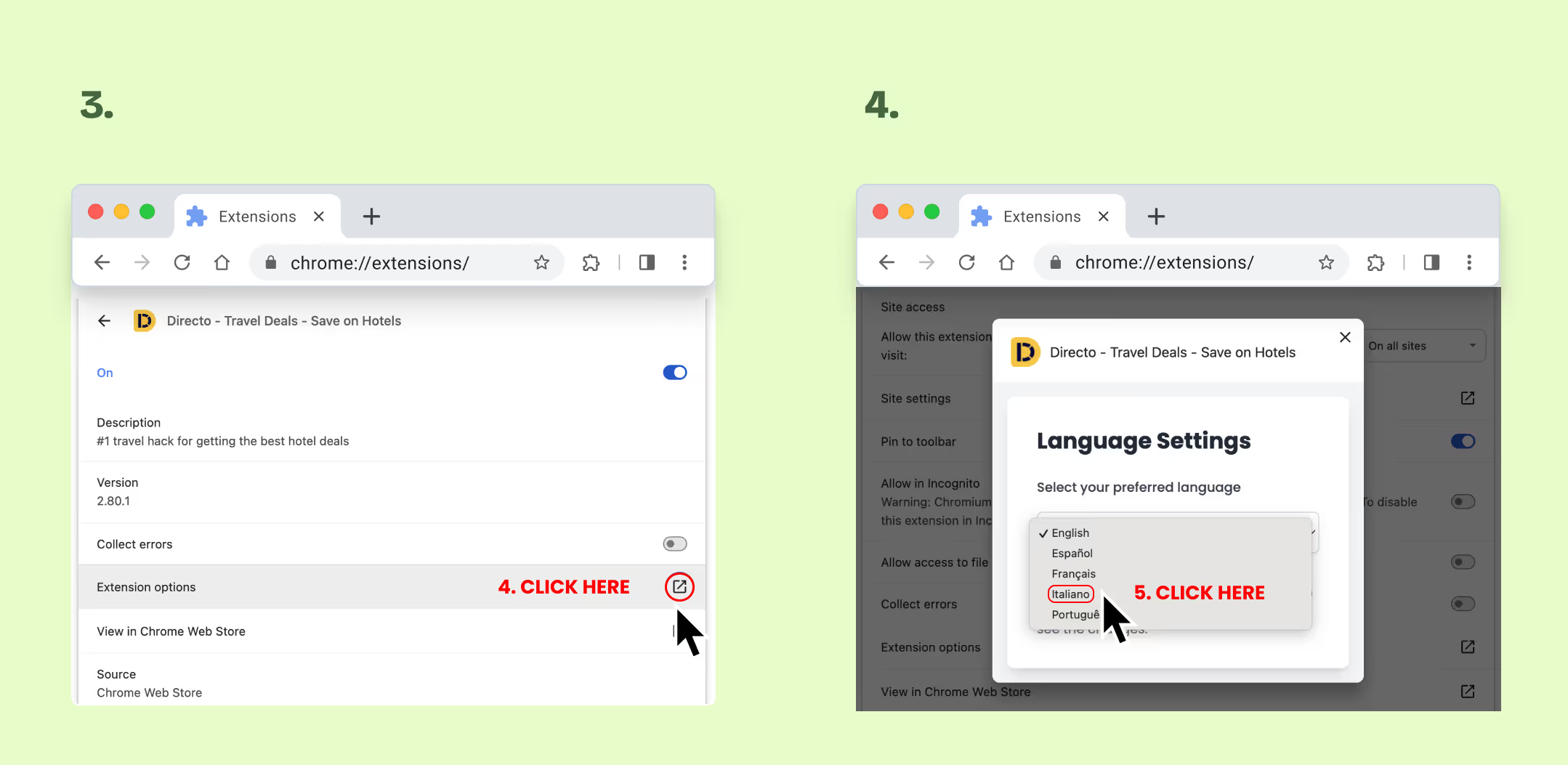
Yes., Directo is available in 5 languages: English, Spanish, italian, French and Portuguese.
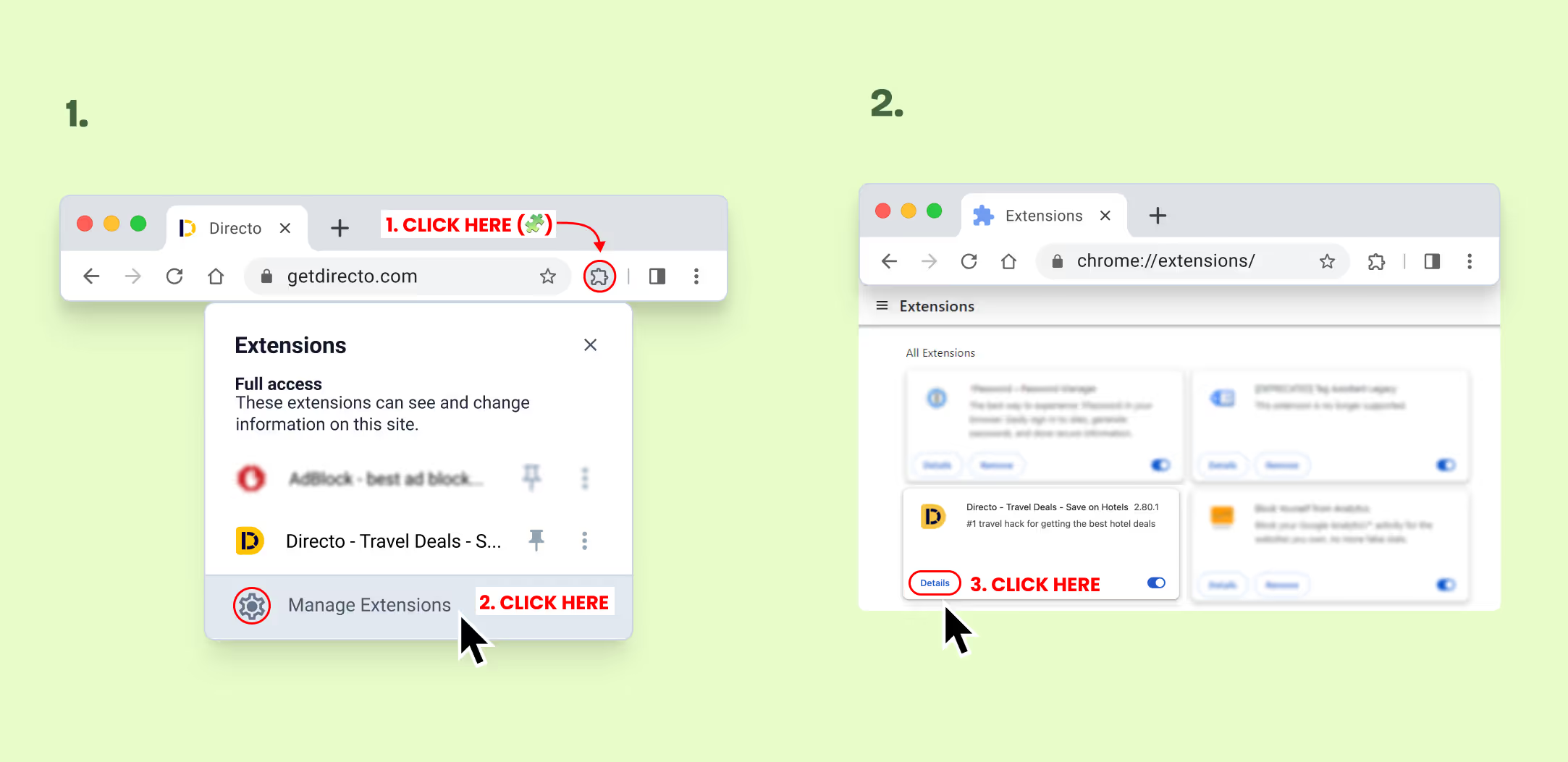
1. Open Manage Extensions in your browser (🧩 icon).
2. Find Directo → Details → Extension Options.
3. Select your preferred language.
4. Refresh the page where you are using Directo.
Yes. Directo helps you find and compare booking options across different sources, all of which are secure.
Depending on how you choose to book, here’s how it works:
- Booking directly with the hotel: You’ll be redirected to the hotel’s official website to complete your reservation.The hotel handles the payment, confirmation, and booking policies.
- Booking a Directo Deal (secure.getdirecto.com): You’ll complete your booking on secure.getdirecto.com, Directo’s official booking platform powered by trusted partners.Payments and reservations are securely handled by our partners, and the accommodation provider remains responsible for your stay.
- Booking through other platforms: You may also be redirected to trusted booking platforms where the same hotel is available. In these cases, the platform handles the payment and reservation, and the accommodation manages your stay.
In the case of direct bookings or alternative bookings on platforms, Directo does not process payments or manage reservations. It simply redirects you to the property’s official website or alternative booking site.
In some cases, you may also see a Directo booking option.
When reservations are booked on secure.getdirecto.com, our trusted partner handles the payments and reservations.
🔔 Payment timing and conditions depend on the booking provider and are always shown before you confirm your reservation.
In some cases, Directo offers a booking option directly through its platform.
These bookings are powered by trusted partners and may include:
- Special negotiated rates (Directo Deals)
- Competitive prices not available elsewhere
Even when booking through Directo, the accommodation provider remains responsible for your stay.
If your booking was made through a Directo partner (secure.getdirecto.com), you can contact our support team at: 👉 vip.cs@nuitee.com
For bookings made directly on a hotel’s website, please contact the hotel directly.
1. Check that the extension is installed:
a. Open your browser (Chrome).
b. Click on the Extensions icon (puzzle 🧩) in the top toolbar or click here
c. Look for Directo – Travel Deals in the list.
👉 If you don’t see it, the extension is not installed correctly. You can install it here on Chrome
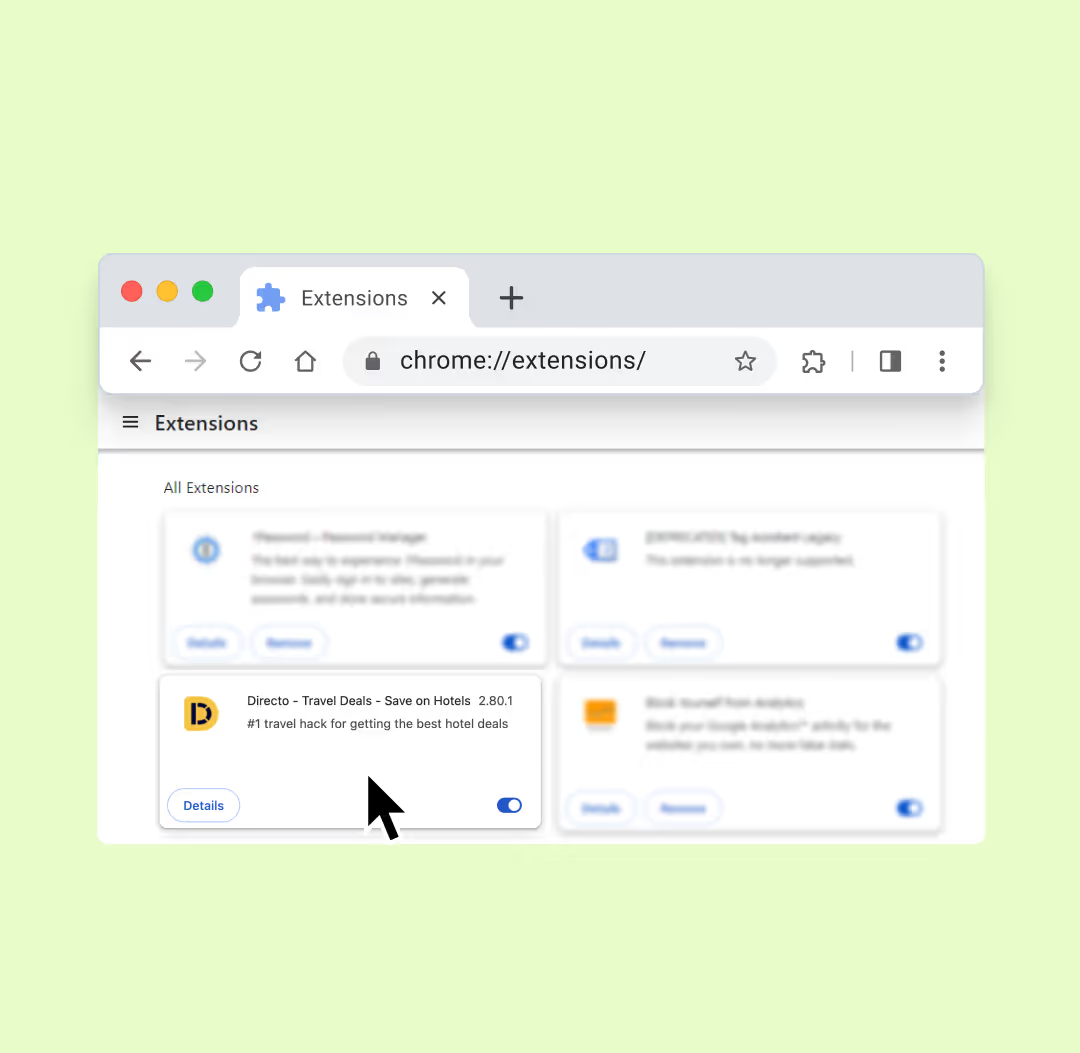
2. Make sure the extension is enabled
a. From the Extensions menu, click on “Manage extensions” or click here
b. Check that Directo is turned ON.
👉 If it’s turned off, enable it and try again.

3. Check Directo Logo on hotels
If you’ve completed the steps above, you can quickly verify that Directo is working by checking whether the Directo “D” logo appears on the following links:
Check Directo in Madrid at this link
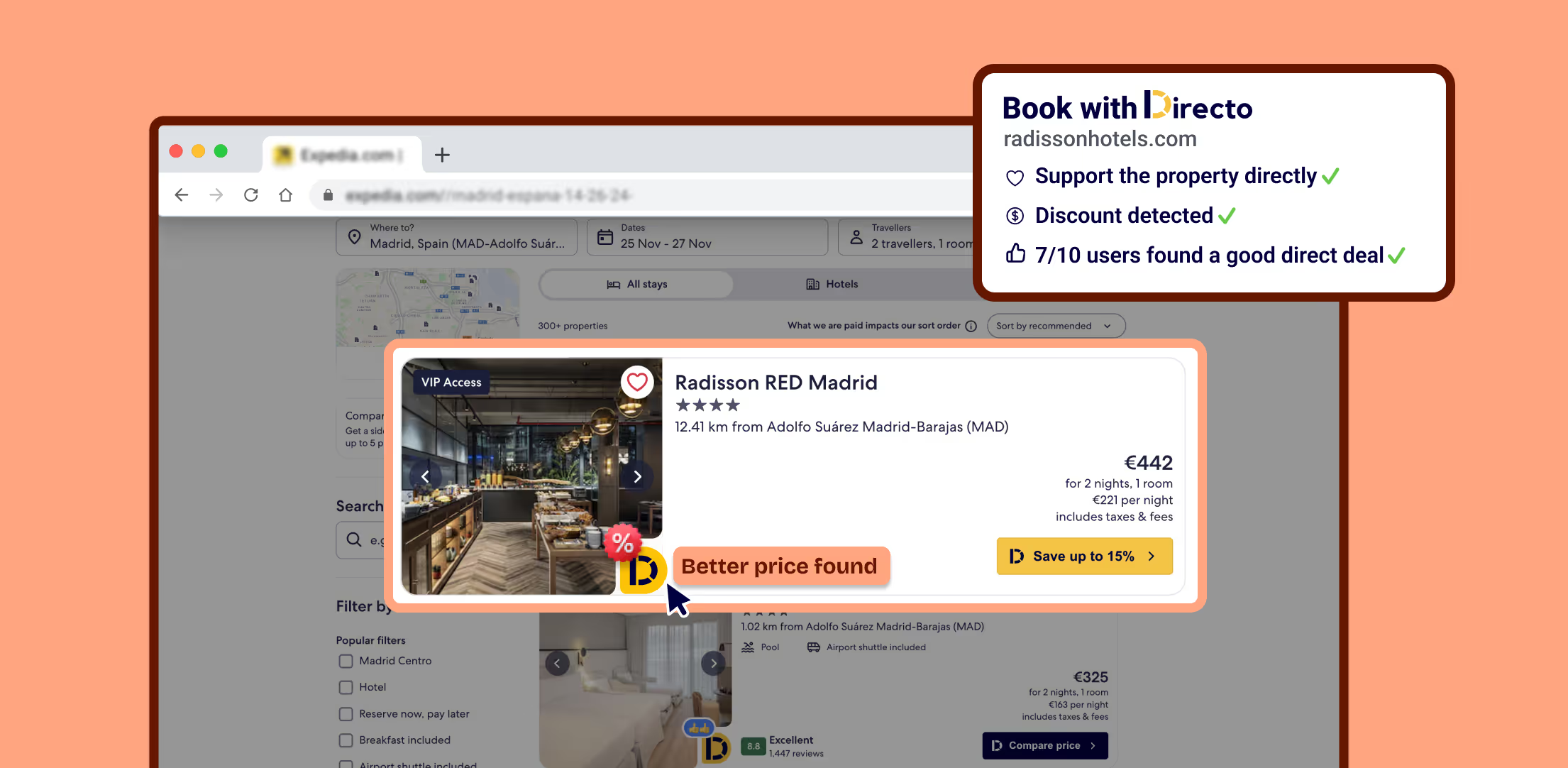
👉 When Directo is working properly, you should see the Directo “D” logo next to available hotel offers.
If the issue persists, please contact us and include:
- The browser you’re using
- The city you’re searching in
- A screenshot of the issue
This will help us assist you much faster 🚀
You can contact us at yourfriends@getdirecto.com and we’ll help you step by step.

Directo is a Free Chrome Extension that lets you access direct links to book your stay while your browse your go-to sites, helping hotels and property managers get more direct traffic while guests get a better deal. Win-win for all.
Copyright © Directo 2025
Privacy policyTerms & Conditions
Cookie Policy
Legal Notice